Unlocking Digital Sparkle: A Guide to the Procreate 3D Glitter Diamonds Brush
In the rapidly evolving world of digital illustration, texture and lighting are often what separate a flat drawing from a masterpiece that leaps off the screen. For artists using iPad-based software, achieving realistic shine, refraction, and sparkle can be technically challenging. This is where specialized tools like the Procreate 3D Glitter Diamonds Brush become indispensable. Designed specifically for the Procreate ecosystem, this tool allows creators to add instant depth, luxury, and eye-catching detail to their work without spending hours manually painting individual highlights.
Whether you are a seasoned illustrator looking to streamline your workflow or a beginner eager to make your lettering pop, understanding how to leverage high-quality digital assets is crucial. This article explores the functionality, application, and technical requirements of the 3D Glitter Diamonds Single Brush, helping you integrate it seamlessly into your creative process.
What Is the Procreate 3D Glitter Diamonds Brush?
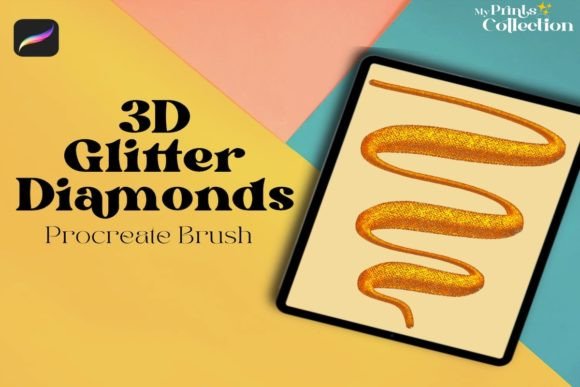
At its core, the Procreate 3D Glitter Diamonds Single Brush is a custom-created digital stamp tool designed for the Procreate app. Unlike standard round or square brushes that simulate pencil, ink, or paint, this brush is engineered to replicate the complex optical properties of cut gemstones and glitter. It simulates the way light interacts with faceted surfaces, creating the illusion of three-dimensional depth on a two-dimensional canvas.
The primary purpose of this tool is efficiency and aesthetic enhancement. Manually painting a diamond involves calculating light sources, reflection angles, and refraction indices—a task that requires advanced knowledge of physics and lighting. This brush automates that process, providing a pre-rendered, high-fidelity diamond shape that responds to your stroke dynamics. It is not just a static image; when used correctly within Procreate, it can vary in size and opacity, allowing for natural-looking clusters of sparkle.
Key Features and Inclusions
When you purchase this digital asset, you are investing in a streamlined solution for adding glamour to your art. Here is exactly what is included in your download:
- One 3D Glitter Diamonds Single Procreate Brush: Delivered as a
.brushsetfile, this is the core tool you will install directly into your Procreate library. - High-Resolution Texture: The brush is designed to maintain clarity even when scaled, ensuring your diamonds look crisp and professional.
- Digital Format: Your completed purchase order includes a download of a zip file sized at approximately 1 MB. This small footprint ensures quick downloads and easy storage on your device.
It is important to note that this is a digital product. No physical item will be shipped to your address. All content is delivered electronically, making it an eco-friendly and instant addition to your toolkit.
Why Use Specialized Brushes in Digital Art?
You might wonder why one should use a specific brush for diamonds rather than drawing them by hand. The answer lies in the balance between artistic control and time management. In professional environments, such as graphic design for advertising, social media content creation, or book cover illustration, deadlines are tight. Clients expect high-impact visuals that grab attention immediately.
Using a dedicated 3D glitter brush offers several advantages:
- Consistency: Every diamond stamped with the brush has a uniform level of quality, ensuring your artwork looks polished and professional.
- Versatility: While designed for gems, these brushes are excellent for creating magical effects, fairy dust, bokeh lights, or futuristic tech interfaces.
- Layering Potential: Because the brush creates distinct shapes, you can easily layer them, change their blend modes (such as "Add" or "Screen"), and adjust their colors to match any palette.
Practical Applications for Creatives
The utility of the 3D Glitter Diamonds Brush extends far beyond simple jewelry illustrations. Here are several ways modern creatives are utilizing this tool to enhance their projects:
Digital Lettering and Calligraphy
Hand-lettering artists often seek ways to make their quotes and titles stand out on platforms like Instagram and Pinterest. Adding subtle diamond sparkles to the crossbars of letters or the dots above "i"s can add a touch of elegance. The 3D effect gives the text a tactile quality, making it appear as though it is encrusted with real jewels.
Fashion and Beauty Illustrations
For those illustrating fashion designs, makeup looks, or accessory concepts, realism is key. A sketch of a necklace or a pair of earrings comes to life when accurate reflections are added. Instead of struggling with white gel pens or opaque layers, artists can use this brush to quickly populate a design with sparkling stones, allowing them to focus more on the fabric draping and overall composition.
Children’s Book Illustrations
Magic and wonder are staples of children’s literature. Whether it is a fairy’s wand, a magical portal, or a treasure chest, the 3D Glitter Diamonds Brush helps create enchanting visuals that captivate young readers. The bright, shiny nature of the brush aligns perfectly with the vibrant color palettes often used in this genre.
Technical Requirements and Compatibility
To ensure a smooth experience, it is vital to understand the technical constraints of this digital tool. Not all software supports the proprietary file formats used by Procreate brushes.
Software Requirement: You must have the Procreate App version 5 or higher installed on your iPad. Older versions of the app may not recognize the newer brush engine features utilized by this tool, leading to installation errors or unexpected behavior.
Incompatibility Notice: This brush is not compatible with Adobe Photoshop, Illustrator, or other desktop-based design software. The .brushset format is exclusive to the Procreate ecosystem. If you are primarily a desktop user, this specific asset will not function in your workflow. Always verify your software version before purchasing to avoid frustration.
Installation Process
Installing the brush is straightforward, but first-time users may find the process unfamiliar. After downloading the 1 MB zip file, you will need to extract the contents to reveal the .brushset file. On your iPad, tap the file and select "Open in Procreate." The app will automatically import the brush into your current brush library, usually placing it in a new set or at the top of your existing list. For a visual guide, it is highly recommended to watch the video in this listing, which demonstrates the import process step-by-step.
Common Misunderstandings About Digital Brushes
There are a few misconceptions surrounding digital brushes that new buyers often encounter. Clarifying these can help you get the most out of your purchase.
Myth 1: The brush does all the work for you.
While the brush provides the shape and texture, artistic intent still matters. You must consider light direction, color harmony, and composition. A diamond placed in shadow should be darker and less saturated than one in direct light. The brush is a tool, not a replacement for artistic judgment.
Myth 2: More brushes equal better art.
Having hundreds of specialized brushes can lead to "tool hoarding," where an artist spends more time browsing libraries than creating. The value of the 3D Glitter Diamonds Brush lies in its specific utility. Mastering one high-quality tool is often more beneficial than possessing dozens of mediocre ones.
Myth 3: Digital sparkle looks fake.
Poorly executed digital effects can indeed look artificial. However, by adjusting the opacity, using blur tools on surrounding areas, and varying the size of the diamonds, you can achieve a photorealistic look. The key is subtlety and integration with the rest of the artwork.
Conclusion
The Procreate 3D Glitter Diamonds Brush represents a powerful intersection of technology and creativity. It empowers artists to add sophisticated, high-end details to their work with minimal effort, freeing up time to focus on broader compositional elements. By understanding its capabilities, respecting its technical requirements, and applying it with artistic intention, you can elevate your digital illustrations, lettering, and designs to new heights.
Remember, this is a digital-only product requiring Procreate version 5 or higher. With the right setup and a bit of practice, this single brush can become a cornerstone of your digital toolkit, adding that perfect touch of shine and sparkle to every project you undertake.