Mastering Visual Depth with 3D Fluid Mixer Brush Gradients in Digital Design
In the rapidly evolving landscape of digital art and graphic design, the demand for textures that convey depth, movement, and tactile realism has never been higher. Designers across industries are constantly seeking tools that bridge the gap between flat digital canvases and the organic complexity of the physical world. This is where 3D Fluid Mixer Brush Gradients emerge as a transformative resource. By leveraging advanced blending techniques and fluid dynamics simulations, these assets allow creators to produce stunning visual effects that captivate audiences on social media, websites, and printed materials alike.
The integration of fluid aesthetics into modern design is not merely a trend but a response to the human desire for organic connection in digital spaces. Unlike standard gradients that transition linearly from one color to another, fluid mixer brushes simulate the behavior of liquid paint, ink, or resin. This results in unpredictable, natural-looking patterns that add a layer of sophistication and uniqueness to any project. For professionals using Adobe Photoshop, having access to a comprehensive toolkit dedicated to this style can significantly streamline the creative workflow while elevating the final output.
The Mechanics of Fluid Design in Photoshop
Understanding how 3D Fluid Mixer Brush Gradients function requires a basic grasp of how digital mixing differs from traditional layering. Standard brushes apply pigment uniformly, but mixer brushes interact with the colors already present on the canvas. They pick up, blend, and smear existing pixels, mimicking the physical action of a painter’s brush moving through wet oil or acrylic. When combined with pre-defined gradient maps, this technology allows for the creation of complex, multi-dimensional swirls and marbling effects with minimal manual effort.
The core advantage of using a specialized preset pack lies in the precision of the simulation. A high-quality toolkit typically includes a fluid brush preset engineered to replicate the viscosity and flow of real-world mediums. This ensures that every stroke feels intentional yet organic. Furthermore, the inclusion of specific mixer brush gradients means that the color transitions are optimized for depth. Instead of flat color shifts, users experience volumetric changes that suggest light refraction and shadow, essential components for achieving a true 3D appearance.
Essential Components of a Professional Fluid Toolkit
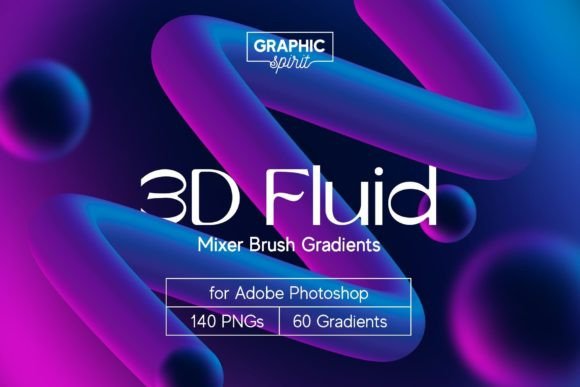
To fully harness the potential of fluid design, one needs more than just a single brush. A robust system comprises several interconnected elements that work in harmony. For instance, a comprehensive package often includes a substantial library of assets, such as 60 Mixer Brush Gradients. These gradients serve as the foundational color palettes, offering a wide spectrum of hues ranging from subtle pastels to vibrant neons. Having a diverse array of gradients ensures that designers can match their fluid effects to various brand identities or artistic moods without spending hours creating custom color stops.
In addition to gradients, the availability of 140 PNG Premade Shapes at high resolutions, such as 3500 px, provides immediate usability. These shapes act as building blocks for compositions. Whether a designer needs a swirling background for a website hero section or an abstract element for a product packaging label, these premade assets save considerable time. They can be layered, masked, and blended into existing designs, allowing for rapid prototyping and iteration. The high resolution ensures that these elements remain crisp and detailed even when scaled for large-format printing.
Another critical component is the Gradient Palette file. This feature allows users to load all available gradients directly into their Photoshop swatches panel. This integration simplifies the selection process, enabling artists to preview and apply colors seamlessly within their workflow. Moreover, tools like the Shape Maker.psd Template empower users to create custom fluid forms. This template likely utilizes smart objects and adjustment layers, providing a non-destructive environment where designers can experiment with different configurations until they achieve the desired aesthetic.
Practical Applications Across Industries
The versatility of 3D Fluid Mixer Brush Gradients makes them applicable to a wide range of professional fields. In the realm of social media marketing, visual stop-power is crucial. Instagram stories, Pinterest pins, and Facebook covers benefit immensely from the dynamic nature of fluid art. The eye is naturally drawn to movement and complexity, making fluid backgrounds an effective way to highlight text or products. A fashion brand, for example, might use swirling pastel fluids to evoke a sense of softness and luxury in their seasonal campaign visuals.
Web and interface design also gain significant value from these tools. Modern web aesthetics often favor bold, abstract backgrounds that do not distract from content but rather enhance the overall user experience. Fluid gradients can be used to create engaging hero sections that guide the user’s eye down the page. Because these effects can be generated as high-resolution PNGs or layered PSDs, they integrate easily into web development workflows without compromising load times if optimized correctly.
Printed materials, including posters, brochures, and packaging, represent another major use case. The tactile quality implied by fluid designs translates well to physical media. Packaging for cosmetics, beverages, or tech accessories often employs fluid art to suggest purity, innovation, or energy. The ability to print these designs at high resolutions ensures that the intricate details of the fluid mixtures are preserved, adding a premium feel to the physical product.
Enhancing Workflow Efficiency and Learning
For many creators, the barrier to entry for complex digital painting techniques is the steep learning curve. However, a well-structured toolkit mitigates this challenge by providing educational resources alongside the assets. A detailed User Guide.pdf offers step-by-step instructions on installing presets, configuring brush settings, and applying gradients effectively. This documentation is invaluable for both beginners who are new to Photoshop and experienced designers looking to expand their skill set into fluid dynamics.
Furthermore, the inclusion of a Video Tutorial provides a visual demonstration of the techniques in action. Watching a professional manipulate the mixer brush, adjust flow and wetness settings, and layer gradients offers insights that text alone cannot convey. These tutorials often cover troubleshooting common issues, such as avoiding muddy colors or maintaining edge definition, which are critical for achieving professional-grade results. This educational support ensures that users can maximize the value of their investment and produce high-quality work consistently.
Considerations for Optimal Results
While 3D Fluid Mixer Brush Gradients offer powerful capabilities, achieving the best results requires attention to detail. One key consideration is color theory. Even with pre-made gradients, understanding how complementary and analogous colors interact within a fluid mix can elevate the design. Designers should experiment with opacity and blending modes to find the right balance between visibility and subtlety. Over-saturating a design with intense fluid patterns can overwhelm the viewer, so restraint and strategic placement are essential.
Another factor is hardware performance. Working with high-resolution files, such as the 3500 px PNGs and complex PSD templates, can be resource-intensive. Ensuring that the computer has sufficient RAM and processing power will prevent lag and crashes during the creative process. Additionally, keeping Photoshop updated to the latest version ensures compatibility with the newest brush engines and features, which may enhance the performance of the mixer brush presets.
Finally, originality remains paramount. While premade shapes and gradients provide a strong starting point, customizing these elements is crucial for creating unique brand identities. Designers should use the Shape Maker.psd Template to modify existing forms or create entirely new ones. Combining multiple gradients, adjusting hue and saturation, and incorporating other design elements like typography or photography will result in a cohesive and distinctive final piece.
The Future of Fluid Aesthetics in Digital Media
As digital displays become more advanced with higher refresh rates and color accuracy, the appeal of fluid design is likely to grow. The ability to simulate realistic physical phenomena digitally opens up new avenues for expression and communication. Tools like 3D Fluid Mixer Brush Gradients are at the forefront of this movement, providing creators with the means to produce visually striking content that resonates with audiences. By integrating these tools into their workflow, designers can stay ahead of trends and deliver compelling visual narratives that stand out in a crowded digital landscape.
Ultimately, the value of such a toolkit lies in its ability to democratize complex artistic techniques. It empowers a broad audience, from hobbyists to seasoned professionals, to explore the beauty of fluid dynamics without needing years of traditional painting experience. With the right resources, including comprehensive guides, video tutorials, and high-quality assets, anyone can master the art of fluid design and bring their creative visions to life with depth, vibrancy, and professionalism.