Golden Sparkles and Lens Flare Effects
Light is more than just illumination in visual design; it is a storytelling tool. When used correctly, light directs the viewer’s eye, establishes mood, and adds a layer of professional polish that flat imagery often lacks. This is where Golden Sparkles and Lens Flare become indispensable assets for modern creators. Whether you are designing a social media graphic, editing wedding photography, or creating promotional materials for a luxury brand, the strategic application of light effects can transform a good composition into a captivating one.
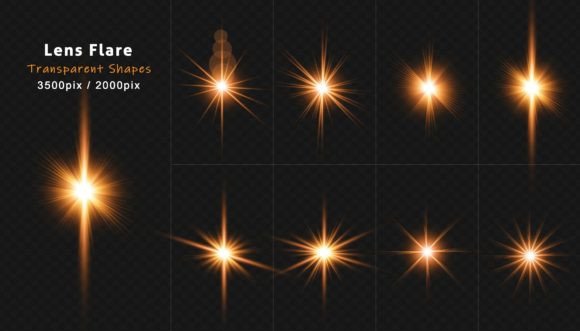
The appeal of these elements lies in their versatility. A well-crafted lens flare does not merely sit on top of an image; it interacts with the underlying content to create depth and atmosphere. By utilizing a curated set of lens flare light effects with transparency isolated on a black background, designers gain precise control over how light integrates into their work. This collection, featuring rays, stars, bokeh, and sparkles, offers a practical solution for those who want high-quality results without the steep learning curve of complex lighting simulations.
Understanding the Visual Impact
At its core, a lens flare is an optical artifact caused by bright light scattering within a camera lens system. In photography, this was once considered a mistake to be avoided. Today, however, it is a deliberate stylistic choice that conveys warmth, energy, and realism. When paired with golden sparkles, the effect shifts from purely realistic to slightly magical or celebratory. This combination is particularly effective because it taps into universal associations with gold: value, warmth, success, and festivity.
The technical advantage of using pre-made assets, such as a set of eight distinct lens flares available in Photoshop and JPEG formats at 3000x2000 pixels, is efficiency. Creating realistic light interactions from scratch requires advanced knowledge of blending modes, masking, and color grading. With transparent overlays, you can achieve similar results in seconds. The isolation on a black background is crucial here, as it allows for easy removal using blending modes like "Screen" or "Lighten," ensuring that only the light remains visible while the dark areas disappear seamlessly.
Creative Applications Across Industries
Different professionals can leverage these light effects to meet specific audience expectations and project goals. Here is how various creators can adapt these tools:
- Wedding and Portrait Photographers: Enhance romantic imagery by adding soft bokeh and gentle golden rays. This creates a dreamy, ethereal quality that clients often seek for engagement photos or anniversary albums. The key is subtlety; the light should feel like it was captured in-camera, not pasted on.
- Social Media Marketers: In a crowded feed, brightness attracts attention. Use sharp starbursts and intense sparkles to highlight product launches, sale announcements, or holiday greetings. These elements draw the eye to specific call-to-action buttons or text overlays.
- Brand Designers: For luxury brands, gold accents signify premium quality. Integrating subtle lens flares into packaging mockups or digital banners can elevate the perceived value of a product. It suggests refinement and attention to detail.
- Event Planners and Bloggers: Create inviting visuals for galas, parties, or festive blog headers. The combination of sparkles and warm light evokes celebration and joy, setting the right emotional tone before the reader even engages with the text.
Techniques for Seamless Integration
To ensure your use of Golden Sparkles and Lens Flare looks professional rather than amateurish, consider the following practical guidelines. The goal is consistency and believability.
First, match the light source. If the original photograph has sunlight coming from the top left, your added lens flare should originate from a similar direction. Misaligned light breaks the illusion of reality and distracts the viewer. Second, pay attention to color temperature. Golden sparkles work best with warm-toned images. If you are working with a cool, blue-toned winter scene, you might need to adjust the hue of the flare or choose a cooler white light effect instead to maintain harmony.
Opacity is your most powerful tool. Rarely should a lens flare be placed at 100% opacity. Start at 50% and adjust downward until the effect enhances the image without overpowering the subject. Use layer masks to erase parts of the flare that cover important details, such as faces or text. This ensures that the light complements the subject rather than obscuring it.
Exploring Style Variations
Not all light effects serve the same purpose. Understanding the nuances within a collection allows for more targeted creativity. For instance, bokeh effects consist of out-of-focus points of light. These are ideal for adding depth and background interest without competing with the main subject. They create a sense of space and atmosphere.
In contrast, starbursts and sharp rays are directional and aggressive. They imply energy, movement, and impact. Use these when you want to create a dynamic focal point or suggest speed and innovation. Sparkles, often smaller and scattered, add texture and a touch of whimsy. They are perfect for beauty products, fashion editorials, or any context where "glamour" is the desired aesthetic.
By mixing these types, you can build complex lighting scenarios. A large, soft flare can establish the ambient mood, while small, sharp sparkles add intricate detail. This layering technique mimics how light behaves in the real world, where multiple reflections and refractions occur simultaneously.
Practical Workflow Tips
When working with high-resolution files like the 3000x2000 pixel JPEGs included in this set, organization is key. Keep your light effect layers in a dedicated group folder in your Photoshop file. Name them clearly, such as "Flare_TopLeft" or "Sparkles_Subtle." This makes it easier to toggle visibility on and off as you refine the design.
Also, consider the final output format. If you are designing for web use, ensure that the added light effects do not introduce unwanted noise or compression artifacts. Save your final images in appropriate formats that preserve the smooth gradients of the light. For print projects, the high resolution of these assets ensures that the edges of the flares remain crisp and clean, avoiding pixelation.
Ultimately, the value of Golden Sparkles and Lens Flare lies in their ability to evoke emotion. Light is inherently positive. It suggests clarity, hope, and energy. By mastering these simple yet powerful tools, you can elevate your visual communication, making your designs not just seen, but felt. Whether you are a freelancer looking to speed up your workflow or a business owner aiming to enhance your brand’s visual identity, these effects offer a straightforward path to more engaging and professional results.