Dans Texture Brush: Elevate Your Digital Art
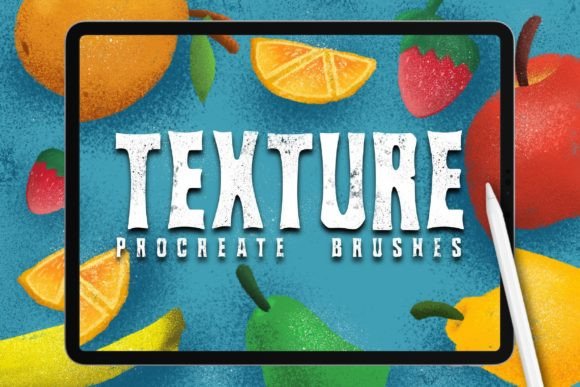
We have been working with the graphic design world for a long time, observing trends shift from rigid vector precision to a renewed appreciation for organic imperfection. Recently, we saw a distinct demand for special materials tailored for people who want to work in the graphic design world to create digital illustrations that feel authentic. As designers, we understand the frustration of sterile, overly smooth digital lines. We have spent hours dedicated to creating handcrafted analog style resources for working digitally on Procreate using iPad Pro and Apple Pencil. Our designed brush set allows you to have perfect creation possibilities, bridging the gap between traditional media and modern efficiency.
The Appeal of Analog Warmth in a Digital Space
In an era where AI-generated images and stock vectors dominate the visual landscape, standing out requires a unique voice. Dans Texture Brush offers more than just a tool; it provides a stylistic identity. The core value lies in its ability to replicate the tactile sensation of paper, charcoal, ink bleed, and dry brush strokes. This is not about mimicking reality perfectly, but rather capturing the spirit of handmade art.
When you use these brushes, you are not just drawing; you are texturing your narrative. The subtle grain and irregular edges break up the monotony of flat colors, adding depth and dimension that viewers subconsciously associate with quality and effort. For marketers and small business owners, this translates to branding that feels approachable and human. For hobbyists, it removes the intimidation factor of starting with a blank white canvas, offering a textured base that invites experimentation.
Versatile Applications for Diverse Creators
The utility of Dans Texture Brush extends far beyond simple sketching. Its versatility makes it an essential asset for various professionals and creatives. Here is how different users can adapt this tool for their specific goals:
- Illustrators and Concept Artists: Use the rougher texture brushes to block out initial concepts quickly. The inherent noise helps in judging values and composition without getting bogged down in details too early.
- Graphic Designers: Incorporate textured elements into logos, posters, and packaging designs. A textured background or a hand-drawn icon can soften corporate aesthetics, making them more relatable to younger demographics.
- Social Media Managers: Create eye-catching story templates and post graphics. Textured overlays add visual interest to static images, increasing engagement rates by stopping the scroll.
- Educators and Publishers: Develop engaging educational materials. Hand-drawn diagrams and textured highlights can make complex information feel less dense and more accessible to students.
Enhancing Brand Identity with Organic Elements
For entrepreneurs and freelancers, consistency is key. However, consistency does not mean rigidity. Using Dans Texture Brush allows you to maintain a cohesive brand palette while introducing organic variation. Imagine a coffee shop brand that uses a consistent earth-tone palette but applies it with a chalk-like texture on social media. This creates a sensory connection to the product itself. The brush set enables you to build a library of reusable assets—textured shapes, borders, and icons—that keep your content fresh yet recognizable.
Practical Techniques for Maximum Impact
To get the most out of these resources, it is important to understand how to layer and blend them effectively. Digital art can sometimes look muddy if textures are overused. Here are some practical recommendations to keep your results clear and effective:
- Start with Subtlety: Begin with low opacity settings. It is easier to build up texture than to remove it. Use the brush to add slight variations to shadows and highlights rather than covering entire areas.
- Layer Blending Modes: Experiment with blending modes like Multiply, Overlay, and Soft Light. Placing a textured layer over a flat color and setting it to Overlay can instantly add depth without altering the underlying hue significantly.
- Mix Media Styles: Combine smooth vector-like lines with textured fills. This contrast draws the eye and creates a dynamic visual hierarchy. Use the Apple Pencil’s pressure sensitivity to vary line weight, enhancing the handcrafted feel.
- Create Custom Palettes: Save your favorite texture combinations as swatches. This ensures consistency across different projects and saves time during the creative process.
Overcoming Creative Blocks
One of the most significant benefits of having a specialized toolset is the reduction of decision fatigue. When you stare at a blank screen, the infinite possibilities can be paralyzing. Dans Texture Brush provides a starting point. The tactile feedback of the brush encourages playfulness. Scribble, smear, and stamp. Often, the best ideas come from accidental marks. By allowing yourself to make "messy" marks, you unlock a flow state that rigid tools often inhibit.
For bloggers and content creators, this approach can translate into unique header images and featured graphics. Instead of relying on generic stock photos, you can create abstract textured backgrounds that complement your writing tone. A serious technical article might benefit from a structured, grid-like texture, while a lifestyle piece could shine with soft, watercolor-style washes.
Organizing Your Digital Workflow
As your library of textures grows, organization becomes crucial. To maintain efficiency, categorize your brushes by function rather than just name. Group them into categories such as "Base Textures," "Detailing," "Edges," and "Effects." This systematic approach ensures that you spend less time searching for the right tool and more time creating.
Furthermore, consider creating template files in Procreate that already have your preferred texture layers set up. This allows you to jump straight into ideation without setting up your workspace every time. For teams, sharing these standardized templates ensures that all members produce work that aligns with the brand’s visual language, maintaining professionalism and coherence.
Conclusion: Embracing the Human Touch
In a digital world that increasingly values speed and automation, there is a growing premium on work that feels human. Dans Texture Brush empowers you to inject that humanity into your digital creations. Whether you are designing a logo, illustrating a children’s book, or crafting social media content, these tools provide the nuance and warmth that resonate with audiences.
By integrating these handcrafted analog style resources into your workflow, you are not just improving the aesthetic quality of your work; you are enhancing its emotional impact. Remember, the goal is not to hide the digital nature of your work, but to enrich it with the soul of traditional artistry. Explore the possibilities, experiment with layers, and let your unique style emerge through the texture.
For those ready to elevate their digital illustration game, investing in high-quality, purpose-built tools is a step toward greater creative freedom. Let your next project be defined not just by what you draw, but by how it feels to look at it.